
3D-Printed Architectural Models in White SLS Nylon
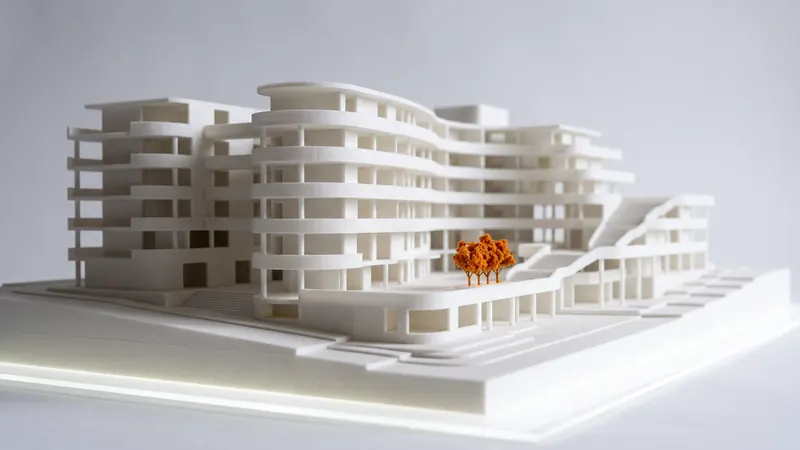
White models are the classic language of architecture, and SLS prints them directly from the 3D model: matte white PA 12, fine detail, overhanging balconies and curved facades without support marks. This guide explains which scales work, how thin walls and details can be, how to keep large models affordable and how to combine white buildings with dyed context.
Why SLS suits architectural models
- Uniform matte white. Natural PA 12 is white throughout, and after blasting and polishing the surface is even and matte, without the shine and layer lines of many filament prints.
- No supports. Cantilevers, balconies, arcades and curved roofs are carried by the powder while they are printed. There is nothing to cut off and no marks under overhangs.
- Complex geometry at no extra cost. Parametric facades, lattices and free-form shells cost the same per cm³ as a simple block.
- Robust. PA 12 is tough rather than brittle, so models survive transport to the client and the competition jury.
Scale and minimum features
The question is always the smallest feature at the chosen scale. Our design review warns about walls thinner than 0.8 mm. Use it as the floor and plan important elements thicker.
| Element (real size) | 1:50 | 1:100 | 1:200 | 1:500 |
|---|---|---|---|---|
| Wall, 200 mm | 4 mm | 2 mm | 1 mm | 0.4 mm (merge into the mass) |
| Slab, 250 mm | 5 mm | 2.5 mm | 1.25 mm | 0.5 mm (merge) |
| Column, 400 mm | 8 mm | 4 mm | 2 mm | 0.8 mm |
| Railing post, 50 mm | 1 mm | 0.5 mm (thicken or omit) | omit | omit |
| Window mullion, 60 mm | 1.2 mm | 0.6 mm (thicken or engrave) | engrave | omit |
Details below the limit are better shown as shallow grooves on the facade or left out. A model looks crisper when it is simplified for its scale than when every mullion is thinned to the edge of what prints.
Hollow buildings save cost
Price follows the volume of material. A solid 1:200 tower is mostly plastic nobody sees. Shell the buildings to an even wall of about 1.5 to 2 mm and open the bottom, or, for closed volumes, add at least two escape holes of at least 5 mm per cavity, so the unfused powder can be removed. The calculator flags enclosed cavities. See hollow parts and escape holes.
Large sites: tiles and assemblies
The chamber of the EOS FORMIGA P 110 Velocis is 200 × 250 × 330 mm nominal. Larger sites are split into tiles along streets or plot lines, or into separate buildings that sit on a base plate. Locating pins and holes keep the tiles aligned; plan the clearance from our guideline of ±0.3 % (at least ±0.3 mm), see SLS tolerances and clearances. Large flat plates can warp slightly; ribs underneath and moderate plate sizes help. Many architects print only the buildings and make the base from board.
White design, dyed context
A common presentation is the design in white and the surroundings in a quieter color, or the reverse. We dye whole parts, not single faces, so print the context buildings, trees or landscape as separate parts and dye them. Black and orange are in stock; the other 59 colors add about one month (20 working days) at the same price. See dyeing SLS parts. Multi-colored single parts, photo textures or transparent glazing are not possible with SLS in PA 12.
Labels, north arrows and bases
Street names, a north arrow or the project name can be embossed or engraved on the base plate; see text and logos on SLS parts for minimum sizes.
Preparing the model files
- Export closed, watertight solids; BIM exports often contain open surfaces, duplicated faces or zero-thickness glass. Check the mesh as described in how to check and repair an STL.
- Scale the model in CAD before export; the calculator does not scale. STL is read in millimeters. See units, scale and multi-body files.
- One file can contain many buildings; each becomes its own part, and identical buildings become one line with a quantity.
Ordering
Upload all files, check the design review for thin walls and cavities, and choose the delivery speed: Express when the presentation date is close, Economy when there is time. Put the whole model into one order: above a certain total volume of parts, a volume discount on printing applies. Step by step: how to order SLS 3D printing online.
Frequently asked questions
Is SLS suitable for architectural models?
Yes, especially for white massing and detail models. SLS prints without supports, so balconies, cantilevers and curved facades come out clean, and natural PA 12 is a uniform matte white.
What scale works best for 3D-printed architectural models?
It depends on the smallest feature. Our design review warns about walls thinner than 0.8 mm, so a 200 mm wall works from about 1:200, and window mullions or railings need a coarser scale or a simplified, thickened design.
How large can a printed architectural model be?
The chamber is 200 × 250 × 330 mm nominal. Larger sites are split into tiles or building blocks with locating pins and assembled on a base.
Can architectural models be printed in color?
We print in white PA 12 and can dye whole parts in 61 colors, for example context buildings or landscape in one color and the design in white. Full-color printing in one part is not possible.
How can I reduce the cost of a large model?
Price follows the material volume, so hollow buildings with escape holes and thin base plates cost much less than solid blocks. Put all parts into one order to reach the volume discount.
Get an instant price
Upload STEP or STL files to the calculator and see the price of your parts in seconds: white Nylon PA 12, blasting and polishing included, optional dyeing in 61 colors, three delivery speeds. From there you send the order preview for confirmation.
Another material, an NDA or a large series? Write to us. For design help and prototype development see prototype.builders.
Get an instant price