
Text, Logos and Labels on SLS Parts: Embossed, Engraved and Readable
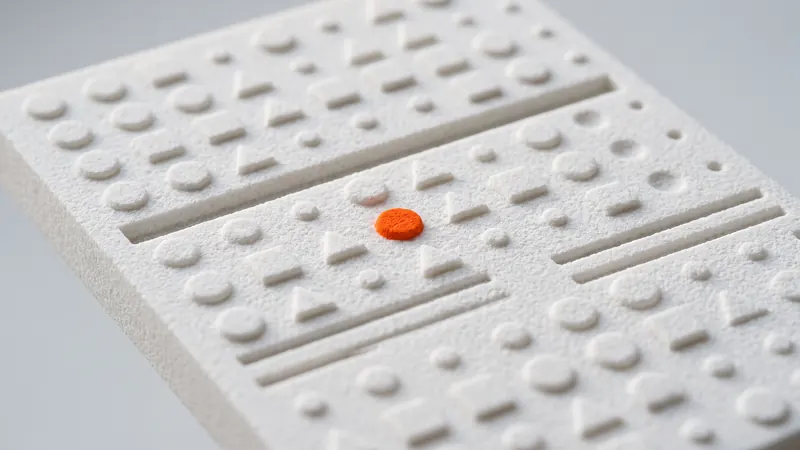
Part numbers, logos, arrows, scales and short instructions can be printed directly into an SLS part, without a second operation. Whether they come out crisp and readable depends on a few design choices: raised or recessed, how high or deep, which font and where on the part. This guide explains them for laser-sintered PA 12.
Why put text into the model
- Permanent: the lettering is part of the material and cannot peel off like a sticker.
- No extra step: it is printed with the part, so it costs no separate operation.
- Traceability: part numbers, versions, dates or cavity numbers make parts easy to identify in assembly and service.
- Function: arrows, scales, "open" and "close" marks or left/right markings prevent mistakes, for example on jigs and fixtures.
- Branding: a logo on a housing or a product prototype.
Embossed or engraved?
| Embossed (raised) | Engraved (recessed) | |
|---|---|---|
| Readability | Good, especially with light from the side | Good; fill with paint after delivery for contrast |
| Robustness | Thin raised strokes can be damaged in handling | Protected inside the surface |
| Flat mating faces | Gets in the way | Keeps the surface flat |
| Powder and blasting | Easy to clean | Very narrow, deep strokes can hold powder |
| Typical use | Logos, large labels, tactile marks | Part numbers, scales, faces that touch other parts |
Height, depth and stroke width
Our SLS design guidelines recommend text that is about 1 mm high (embossed) or 1 mm deep (engraved). The reason is the powder: grains next to the fused outline partly melt and stick to the surface, and glass-bead blasting and polishing round sharp edges slightly. Very shallow or very fine lettering therefore loses contrast and sharpness.
- Character size: larger characters read better; small text with thin strokes fills in or rounds off.
- Stroke width: thin strokes are the first to disappear. Make them clearly thicker than a hairline.
- Spacing: give letters and lines some room; narrow gaps between raised strokes can fill with partly sintered powder.
- Enclosed counters: the small openings in letters such as a, e, o or 8 are the first to close in engraved text. A simpler, more open font helps.
Fonts that work
Use a bold, simple sans-serif font with even stroke width. Thin serifs, hairlines and script fonts lose detail. Stencil-like or engineering fonts work well for part numbers. Avoid very condensed fonts, whose counters close up. If a logo has fine lines, simplify it for the part or make it larger.
Orientation and surface
Layers are 0.12 mm thick. Vertical and horizontal faces look the most uniform; on gently sloped faces fine steps can cut through small characters. Text on a flat or vertical face reads best. Text on curved surfaces works if it follows the surface with constant height or depth. Every part is glass-bead blasted and polished in a DyeMansion Powershot DUAL, which gives a matte, even surface and slightly rounds edges; text designed to the guideline survives it well.
Color and contrast
A dyed part has one color: the dye colors the whole surface layer, so the lettering has the same color as the part. Contrast comes from light and shadow on the relief. Options for stronger contrast:
- Paint fill after delivery: engraved text filled with paint and wiped off the surface.
- Two parts in two colors: for example an orange badge or insert that clips or presses into a black part. Black and orange are in stock; all 61 colors of the color catalog can be chosen in the calculator, with about one month longer delivery for colors that are not in stock.
- Labels or other marking: adhesive labels, pad printing or laser marking can be applied after delivery by a specialist.
More in dyeing SLS parts.
Part numbers and variants
Each different text means a different model. That is no problem in SLS: ten parts with ten serial numbers are ten files in one order, printed in the same job without tooling. Keep the text in a separate feature in your CAD model so the numbers are quick to change, and export each variant as its own STEP or STL file. The STEP vs STL guide explains which format to upload.
Turning a logo into geometry
- Start from a vector version of the logo (for example SVG or DXF), not a pixel image.
- Import it as a sketch in CAD and extrude it up (embossed) or cut it in (engraved) by about 1 mm.
- Thicken lines that are too fine, and merge small details that would fill in.
- Check that the result is one clean solid with the part; overlapping or open bodies can cause mesh errors. See how to check and repair an STL.
- Use only logos and trademarks you are allowed to use.
Checklist for text on SLS parts
- About 1 mm high or deep.
- Bold, simple sans-serif font, strokes clearly thicker than a hairline.
- Open counters and enough spacing between characters.
- Text on flat, vertical or evenly curved faces, not on shallow slopes.
- Engraved text on faces that touch other parts.
- Contrast planned: relief, paint fill, two colored parts or a label.
Frequently asked questions
How deep should engraved text be on an SLS part?
About 1 mm deep, according to our design guidelines. Shallower lettering loses contrast because the powder surface and the blasting and polishing soften fine detail.
How high should embossed text be?
About 1 mm high, with a bold, simple font. Very thin raised strokes can be damaged in handling and lose sharpness during finishing.
Which font is best for 3D-printed text?
A bold sans-serif font with even stroke width and open letter shapes. Thin serifs, hairlines, script fonts and very condensed fonts lose detail.
Can the text be a different color from the part?
Not in one print: a dyed part has one color. For contrast, fill engraved text with paint after delivery, combine two parts in different colors, or apply a label or other marking afterwards.
Can each part have its own serial number?
Yes. Each variant is its own model file; ten different numbers are ten files in one order, printed without tooling.
Does text add to the price?
Text is printed together with the part and needs no extra operation. The price comes from the calculator for the whole part, as for any other geometry.
Get an instant price
Upload STEP or STL files to the calculator and see the price of your parts in seconds: white Nylon PA 12, blasting and polishing included, optional dyeing in 61 colors, three delivery speeds. From there you send the order preview for confirmation.
Another material, an NDA or a large series? Write to us. For design help and prototype development see prototype.builders.
Get an instant price