
SLS Design Guidelines: Wall Thickness, Holes, Escape Holes and Minimum Features
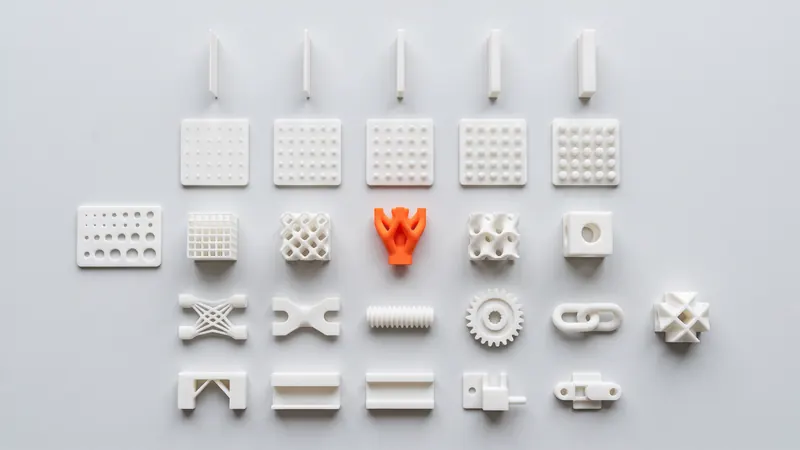
Selective laser sintering forgives a lot: no supports, no draft angles, no tooling. A few rules still decide whether a part comes out strong, accurate and affordable. This page collects them in one place for laser-sintered Nylon PA 12, explains the reason behind each rule and links to the detailed guides on tolerances, threads and snap-fits.
The process in brief
A laser fuses thin layers of PA 12 powder inside a heated chamber. The unfused powder around the part supports it, so overhangs, undercuts and internal channels need no support structures. After printing, the parts cool slowly in the powder, are unpacked, blasted and polished, and optionally dyed. Every rule below follows from one of these steps.
| Our setup | Value | Source |
|---|---|---|
| Printer | EOS FORMIGA P 110 Velocis | EOS |
| Chamber size (nominal) | 200 × 250 × 330 mm | EOS system data |
| Material | White Nylon PA 12 (EOS PA 2200) | EOS |
| Layer thickness | 0.12 mm | EOS, PA 2200 Balance process |
| Finishing | Glass-bead blasting and polishing in a DyeMansion Powershot DUAL, included | DyeMansion |
| Coloring | TCN liquid dyes, 61 colors (black and orange in stock) | TCN |
| General tolerance | ±0.3 %, min ±0.3 mm (our design guideline) | SLS Market |
The rulebook
These are common industry guidelines for laser-sintered PA 12. They are starting points, not hard limits: geometry, orientation and size all play a part.
| Feature | Guideline | Why |
|---|---|---|
| Minimum wall thickness | 0.8 to 1.0 mm | Thinner walls may break during unpacking and blasting; the calculator warns below 0.8 mm |
| Recommended wall for stable parts | about 1.5 to 3 mm | Stiff enough for handling, thin enough to avoid shrinkage and sink |
| Minimum hole diameter | about 1.5 mm | Small holes fill with partly sintered powder |
| Gap between parts printed in place | at least 0.5 mm | Narrower gaps can fuse |
| Sliding fit between two printed parts | about 0.3 to 0.5 mm in total | Powder adhesion and tolerance |
| Escape holes in hollow parts | at least two, at least 5 mm | Powder must be blown out; enclosed powder stays in the part |
| Embossed or engraved text | about 1 mm high or deep | The powder surface softens fine detail |
| Thick solid sections | Hollow them or add ribs | Heat accumulation causes shrinkage, sink and warping |
| Large flat plates | Add ribs, a flange or slight curvature | Flat areas cool unevenly and can bow |
| Largest part | Must fit the 200 × 250 × 330 mm chamber | The calculator checks the fit, including tilted positions |
Walls
Wall thickness is the rule that matters most. Too thin and the wall breaks or bends during unpacking and blasting; too thick and the part shrinks unevenly, warps and uses more powder than needed. A uniform wall of about 1.5 to 3 mm is the comfortable range for housings, brackets and covers. Where you need stiffness, add ribs instead of making the whole wall thicker.
- Keep wall thickness as even as possible across the part.
- Avoid thick lumps next to thin walls; core them out.
- Round internal corners with a fillet to spread stress.
- Thin features standing alone (pins, tabs, fins) need more thickness than walls supported on both sides.
When you upload a model, the calculator's design review measures the walls and warns when a noticeable share of the part is thinner than 0.8 mm.
Holes, pins and slots
Powder grains next to the fused outline partly melt and stick to the surface. That is why holes and slots come out slightly smaller and pins slightly larger than designed. Holes under about 1.5 mm can close up, and long, narrow holes are hard to clean.
- Design holes to nominal size and drill or ream them when you need an accurate diameter.
- Give small through holes a larger diameter or shorter length so powder can be blown out.
- For screws, threads and inserts see threads and heat-set inserts in SLS PA 12.
- For fits and clearances see SLS tolerances and clearances.
Hollow parts and escape holes
Hollowing a thick part saves material and reduces distortion. But the powder inside a closed cavity can never be removed: it stays in the part as loose powder or a soft cake and adds weight. Give every hollow region at least two escape holes of at least 5 mm, ideally on opposite sides, so air can flow through while the powder is blown out.
The calculator finds enclosed cavities when you upload a model, marks them in the 3D viewer and prices the part as solid until escape holes are added. It also flags deep, narrow channels from which powder is hard to remove.
Moving parts and assemblies
Because the part is surrounded by loose powder during printing, hinges, chains, ball joints and gear trains can be printed already assembled. Keep at least 0.5 mm between the moving surfaces, make sure the powder can escape from each joint and avoid long, narrow gaps. For clips and latches, the snap-fit design guide shows how to size the beams so they flex without breaking.
Orientation and layers
Layers are 0.12 mm thick. Gently sloped surfaces show fine steps; vertical and horizontal faces look the most uniform. Strength also depends on direction: EOS gives a tensile strength of 48 MPa and an elongation at break of 18 % within the layer plane for PA 2200, compared with 42 MPa and 4 % across the layers. Parts that flex, such as clips and living features, are strongest when the flexing direction lies in the layer plane.
In the calculator you can choose the layer plane per part (XY, XZ or YZ) or let us decide. Print preparation then orients the part in the print job; if one face or direction is critical, design it so that it does not depend on orientation, or note it when you send the order.
Surface, text and details
Laser-sintered PA 12 has a matte, slightly grainy surface. Glass-bead blasting and polishing in the DyeMansion Powershot DUAL, included in every order, makes it more uniform and pleasant to touch; according to DyeMansion, this surfacing compacts the surface rather than removing material, so the geometry is retained. Edges are rounded slightly.
- Text and logos: about 1 mm high or deep, with a bold, simple font.
- Sharp edges become slightly rounded; do not rely on knife edges.
- Dyed parts are colored in the surface layer by TCN liquid dyes. The color does not add a coating, so dimensions do not change. See the color catalog.
Part size and splitting
The FORMIGA P 110 Velocis has a nominal chamber of 200 × 250 × 330 mm. The calculator checks whether each part fits, also in tilted positions, and says so if a part fits only diagonally or not at all. Larger parts can be split into sections joined with dovetails, pins, screws or adhesive; a part that only just fits diagonally is often cheaper when split, because it nests better with other parts. Size and nesting are also the biggest factors in the price, explained in SLS 3D printing cost.
Files
The calculator accepts STEP and STL. STEP carries its units and exact geometry; STL is a triangle mesh without units, read as millimeters with an inch switch. Each solid body in a file becomes its own part. More in STEP vs STL.
Checklist before you upload
- Walls at least 0.8 to 1.0 mm, ideally an even 1.5 to 3 mm.
- Holes at least about 1.5 mm; accurate bores planned for reaming.
- Thick sections hollowed or ribbed; every cavity has at least two escape holes of at least 5 mm.
- At least 0.5 mm between parts that move.
- Flexing features oriented in the layer plane.
- Large flat plates ribbed or curved.
- Text at least about 1 mm high or deep.
- The part fits 200 × 250 × 330 mm, or it is split.
- Dimensions checked against the general tolerance of ±0.3 % (min ±0.3 mm).
Design-specific values such as wall thickness under load, insert bosses or the strength of a joint depend on the application. For those, the specialists at prototype.builders can review your design intent. Background reading: what is SLS 3D printing and the PA12 nylon guide.
When the checklist is done, the instant SLS calculator runs the same checks on your file and shows the price.
Frequently asked questions
What is the minimum wall thickness for SLS printing?
A common guideline for laser-sintered PA 12 is 0.8 to 1.0 mm. Walls of about 1.5 to 3 mm are more robust for most parts. The calculator warns when a noticeable share of a part is thinner than 0.8 mm.
How big do escape holes need to be in SLS parts?
Give every hollow region at least two escape holes of at least 5 mm, ideally on opposite sides. Powder in a closed cavity cannot be removed and stays in the part.
Does SLS need supports or draft angles?
No. The unfused powder supports the part during printing, so overhangs, undercuts and internal channels need no supports, and no draft angles are needed because there is no mold.
What is the smallest hole SLS can print?
Holes of about 1.5 mm and larger are reliable. Smaller holes can fill with partly sintered powder. For accurate bores, design to nominal size and drill or ream after printing.
What is the largest part you can print?
The nominal chamber of the EOS FORMIGA P 110 Velocis is 200 x 250 x 330 mm. The calculator checks whether a part fits, including tilted positions; larger parts can be split and joined.
Does orientation affect the strength of SLS parts?
Yes, somewhat. For PA 2200, EOS gives 48 MPa tensile strength and 18 % elongation at break within the layer plane and 42 MPa and 4 % across the layers, so flexing features should lie in the layer plane.
Get an instant price
Upload STEP or STL files to the calculator and see the price of your parts in seconds: white Nylon PA 12, blasting and polishing included, optional dyeing in 61 colors, three delivery speeds. From there you send the order preview for confirmation.
Another material, an NDA or a large series? Write to us. For design help and prototype development see prototype.builders.
Get an instant price