
Hollow Parts, Escape Holes and Trapped Powder in SLS
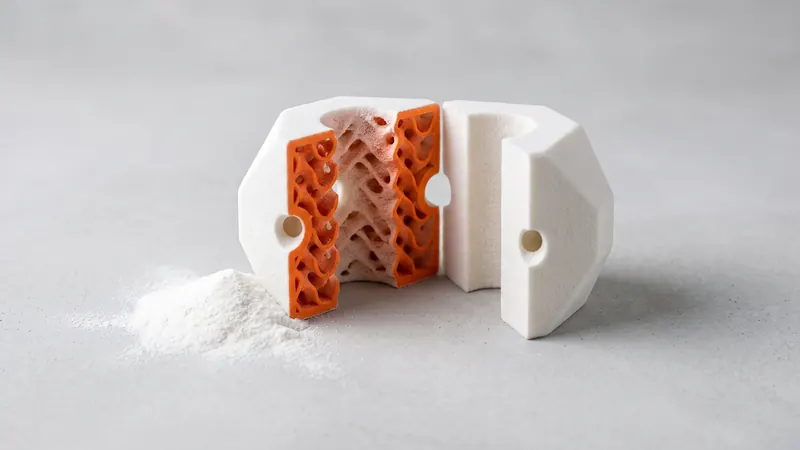
In selective laser sintering every part grows inside a bed of powder, and every space inside the part fills with powder too. If that space is closed, the powder stays inside for good. That is the reason behind one of the most common warnings in our calculator. This guide explains what trapped powder means, how to hollow a part correctly with escape holes, when hollowing saves money and when a solid part is the better choice.
Why closed cavities are a problem in SLS
During printing, the whole chamber is filled layer by layer with PA 12 powder, and the laser fuses only the cross-sections of the parts. Everything else stays loose powder: around the part, and inside every cavity. After printing, the loose powder is removed by depowdering and glass-bead blasting. That only works where the powder can get out. A cavity that is closed on all sides keeps its powder permanently:
- the part is heavier than designed,
- the loose powder can rattle or leak out later through a crack,
- the part can behave differently in vibration or heat,
- and there is no way to check or clean the inside.
What the calculator checks
When you upload a model, the analysis in your browser looks for enclosed cavities, including inward shells that enclose voids. If it finds closed internal cells, it shows a red warning: powder cannot be removed from them. Typical causes are parts exported from slicers for filament printing with closed infill, and solid models with an internal void for weight saving. The design review then offers three ways forward:
- adapt the design for SLS (escape holes, open lattice, solid walls), which the specialists at prototype.builders can do for you,
- print it as designed with a filament technology in another material than PA 12,
- add escape holes yourself and upload again: at least two per closed cell, each at least 5 mm.
The preview prices a part with enclosed cavities as a solid. The calculator also flags thin walls: solid areas thinner than about 0.8 mm may not print reliably.
How to hollow a part correctly
| Rule | Why |
|---|---|
| At least two escape holes per closed cavity | One hole lets powder out, the second lets air in |
| Each hole at least 5 mm, larger for large cavities | Fine powder bridges small holes and does not flow |
| Holes at opposite ends of the cavity | Powder can be blown or shaken through |
| Holes on surfaces that do not matter visually | Bottom faces, mounting faces, hidden areas |
| Even wall thickness, typically 1.5 to 3 mm | Stable walls, accurate dimensions |
| Internal ribs or an open lattice where stiffness is needed | Stiffness without solid mass |
| No closed sub-cells inside the cavity | Each closed cell needs its own holes |
The holes can be plugged afterwards if the appearance matters, for example with a pressed-in plug or a cap; design a small seat for it.
Lattices and internal structures
SLS can print lattices and gyroid-like internal structures without supports. The condition is that the structure is open to the outside so the powder can leave. A lattice behind a closed skin is the typical filament-printing design and needs escape holes or an opened shell. Very fine lattices are hard to clean; keep the openings and bars generous enough for depowdering and blasting.
When hollowing saves money
The price of an SLS part depends mainly on the volume of fused material, the space the part occupies in the chamber and the finishing. Hollowing a thick part reduces the fused volume, sometimes dramatically. A solid block of 80 × 80 × 80 mm and the same block hollowed to 2 mm walls take the same space in the chamber, but the hollow one uses only a fraction of the material. The guide SLS 3D printing cost explains the price drivers; the calculator shows the effect immediately when you upload both versions.
When a solid part is the better choice
- Small parts: below a few centimeters, walls and holes leave little to hollow.
- Highly loaded areas: keep material where the load runs, and use ribs rather than a thin shell.
- Parts that must be sealed or cleaned: escape holes and internal surfaces add places for dirt and moisture.
- Accurate thick sections sometimes benefit from being hollowed anyway: thick solid areas shrink more as they cool, so a shell with ribs can be more accurate than a solid block.
Accuracy and shrinkage are covered in SLS tolerances and clearances; general rules for walls and features in the SLS design guidelines.
Gaps and moving parts are cavities too
The same logic applies to joints printed in place: the gap between a pin and its knuckle is full of powder after printing and must be open to the outside. The rules for hinges, chains and ball joints are in print-in-place hinges and moving assemblies.
Weight and balance
Hollowing also reduces weight, which matters for handheld devices, drone parts and moving machine parts. PA 12 is already light compared with metals, and a hollow part with ribs can be lighter still. Remember that escape holes and internal ribs move the center of gravity; for balanced rotating parts, place holes symmetrically.
Checklist
- No closed cavities, or at least two escape holes of at least 5 mm per cavity.
- Escape holes at opposite ends, on surfaces that do not matter.
- Even walls, typically 1.5 to 3 mm; nothing thinner than about 0.8 mm.
- Internal lattices open to the outside.
- No infill exported from a filament slicer.
- Check the cavity and thin-wall warnings in the calculator after upload.
Frequently asked questions
What is trapped powder in SLS?
Unfused powder that is enclosed in a closed cavity of the part. It cannot be removed after printing, adds weight and makes the part behave differently than designed. The calculator warns about enclosed cavities when you upload the model.
How many escape holes does a hollow SLS part need?
The calculator's design review suggests at least two escape holes per closed cell, each at least 5 mm. Two holes let air in while powder flows out; more and larger holes make depowdering easier for large or complex cavities.
Does hollowing an SLS part make it cheaper?
Often, because the price depends mainly on the volume of fused material. A hollow part with walls of a few millimeters uses much less material than a solid block. The space the part takes in the chamber does not change.
Can I print a part with an internal lattice?
Yes, if the lattice is open so the powder can flow out. A lattice inside a closed shell traps powder and is typical of designs made for filament printing; add escape holes or open the shell.
Why does the calculator say my part looks designed for FDM?
Filament slicers fill parts with closed internal cells (infill). In SLS such cells trap powder. The calculator flags them and offers options: adapt the design, add escape holes, or print it as designed with another technology.
Is a hollow part weaker?
A hollow part with sensible walls can be stiff and strong, especially with internal ribs. For parts under high load, solid sections or ribs where the load runs are the better choice.
Get an instant price
Upload STEP or STL files to the calculator and see the price of your parts in seconds: white Nylon PA 12, blasting and polishing included, optional dyeing in 61 colors, three delivery speeds. From there you send the order preview for confirmation.
Another material, an NDA or a large series? Write to us. For design help and prototype development see prototype.builders.
Get an instant price