
3D-Printed Spare Parts: How to Replace Plastic Parts with SLS Nylon
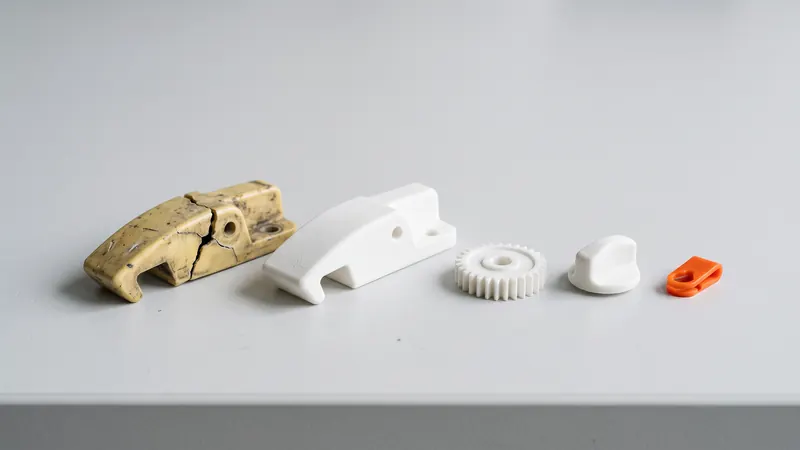
A broken plastic part can stop a machine, a device or a whole production line, and the original is often no longer available or takes weeks to arrive. SLS 3D printing makes single spare parts and small batches in tough PA 12 nylon directly from a CAD file, without a mold. This guide explains which parts are good candidates, how to get from a broken part to a printable file, what to check about the material and how to make the replacement better than the original.
Good candidates for SLS spare parts
SLS PA 12 suits plastic parts that need to be tough and accurate enough to fit, but not glass-clear, rubber-soft or certified:
- Brackets, holders and mounts for sensors, cables, hoses and panels.
- Clips, latches and catches that broke after years of use.
- Covers, caps and housings, including parts with snap-fits.
- Knobs, handles and levers on machines and devices.
- Guides, spacers and rollers with low loads.
- Gears with moderate loads; see 3D-printed gears in PA 12.
- Parts of fixtures and jigs used in production; see drill templates, jigs and fixtures.
Less suitable: transparent parts, seals and rubber parts, parts in permanent contact with hot surfaces, and parts with safety functions.
From a broken part to a printable file
| Starting point | Way to a model | Note |
|---|---|---|
| CAD file from the manufacturer | Export STEP | The best case; ask the manufacturer or check the documentation |
| Simple part (bracket, cover, spacer) | Measure with a caliper and model in CAD | Usually the fastest way; measure several points, not one |
| Complex or freeform part | 3D scan, then a clean CAD model or a repaired mesh | Raw scans need clean-up; see checking and repairing an STL |
| Broken in several pieces | Glue the pieces for measuring, or model from the matching part | Use the mating part to check the fit |
When you export, check the units: a part 25.4 times too small or large was exported in inches or read in the wrong unit. The calculator lets you switch an STL between mm and inches; STEP files carry their unit. More in units, scale and multi-body files.
Check the material against the use
Before ordering, compare the conditions the part will meet with what EOS publishes for PA 2200, the PA 12 we print:
- Strength: tensile strength 48 MPa in X/Y and 42 MPa in Z; elongation at break 18 % and 4 %. See how strong SLS nylon is.
- Heat: heat deflection temperature 64 °C at 1.80 MPa (57 °C in Z) and 157 °C at 0.45 MPa; melting point 176 °C. EOS states a range of -40 to +80 °C under steady stress. See PA 12 heat, chemical and UV resistance.
- Chemicals: EOS lists PA 2200 as resistant to water, fuels, oils and glycol, and not resistant to strong acids such as 10 % hydrochloric acid.
- Water and air tightness: sintered PA 12 is slightly porous and not automatically watertight; see watertight SLS parts.
If the original part was made of a glass-filled or high-temperature plastic, a PA 12 copy of the same shape may be weaker. In that case, strengthen the design or choose another process.
Make the replacement better than the original
A broken part shows exactly where it was too weak. Use that information:
- Add fillets where the part cracked; sharp internal corners concentrate stress.
- Thicken walls or add ribs at the break, while keeping walls even (about 1.5 to 3 mm for housings and brackets).
- Choose the layer plane so that bending clips and tabs flex within the layers, where PA 12 is strongest. In the calculator you can set the layer plane per part.
- Replace molded features that do not suit SLS: a molded thread becomes a heat-set insert; see threads and inserts.
- Merge parts that used to be glued or screwed together into one printed part.
- Mark the part with an embossed revision letter so the next replacement is easy to identify; see text and logos on SLS parts.
Design the fits to our guideline of ±0.3 % (at least ±0.3 mm) and check clearances in SLS tolerances and clearances.
A digital spare-parts stock
For parts that wear, you do not need shelves full of spares. Keep the verified file with its revision, and order when a part is needed or when a few have accumulated. A few practical rules:
- Name files with the part number and revision.
- Note the color, layer plane and delivery level you used, so a reorder gives the same part.
- Your requested quotes stay in your account, which makes reordering simple.
- Order several spares together when the part wears regularly: a larger order gets a volume discount on printing.
Color and finish
Every part is glass-bead blasted and polished. Natural white suits most technical parts; black is the usual choice for machine parts and is in stock, as is orange. The other 59 colors add about one month (20 working days) to the delivery time, at the same price. See dyeing SLS parts.
A word on responsibility
A replacement part changes a product someone else designed. For non-critical functions such as covers, holders and knobs, that is usually straightforward. If the part has a safety function, carries a significant load or is part of a certified product, the person responsible for the machine or device has to check and approve it. We print to the file and finish the parts carefully, but we do not certify parts for safety functions. If you also need to respect the rights of the original manufacturer, copy only parts you are allowed to reproduce.
Need help turning a broken part into a good CAD model? The engineers at prototype.builders can measure, model and improve it.
Frequently asked questions
Can broken plastic parts be replaced with 3D printing?
Many can. Brackets, clips, covers, knobs, guides, housings and similar plastic parts are good candidates for SLS PA 12. The part needs a 3D model, and the material must suit the load, temperature and chemicals it will meet.
I only have the broken part. How do I get a 3D model?
Measure it and model it in CAD, or have it 3D scanned and turn the scan into a clean model. Measuring is usually enough for simple parts; complex freeform parts benefit from a scan. We print from STEP or STL files.
Is PA 12 as good as the original plastic?
It depends on the original. PA 12 is tough and resistant to oils, fuels and many chemicals. EOS gives PA 2200 a heat deflection temperature of 64 °C at 1.80 MPa, so parts that get hot under load need checking.
Can I order just one spare part?
Yes. The calculator prices single parts as well as small batches, and there is no mold. Ordering a few spares at once can make sense for parts that wear.
Can I use 3D-printed parts for safety-relevant functions?
Only if whoever is responsible for the machine or device has checked and approved it. We do not certify parts for safety functions, so we recommend SLS replacement parts for non-critical functions.
Get an instant price
Upload STEP or STL files to the calculator and see the price of your parts in seconds: white Nylon PA 12, blasting and polishing included, optional dyeing in 61 colors, three delivery speeds. From there you send the order preview for confirmation.
Another material, an NDA or a large series? Write to us. For design help and prototype development see prototype.builders.
Get an instant price