
SLS 3D Printing for Universities, Schools and Student Teams
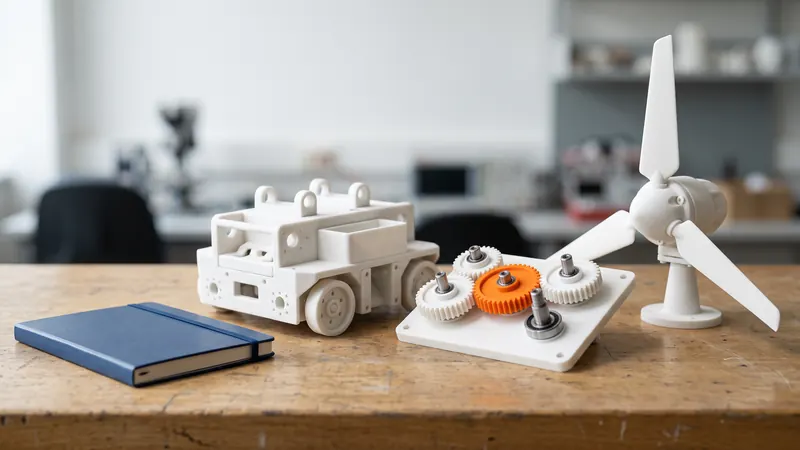
Many schools have desktop 3D printers, but few have an industrial SLS printer, and student projects often need parts that a filament printer cannot make: tough, functional, without supports and in small series. This guide shows where SLS in PA 12 helps in teaching and research, how student teams and departments can order efficiently and what students learn from designing for a powder bed process.
Where SLS helps in teaching and research
| Use | Examples | Why SLS fits |
|---|---|---|
| Student competition teams | Racing car brackets, ducts, housings; robot and drone parts | Tough PA 12, light, complex shapes without supports |
| Laboratory fixtures | Sample holders, jigs, sensor mounts, test rigs | Shaped to the experiment, quick to change |
| Teaching models | Gear trains, mechanisms, anatomy-like or crystal models | Moving assemblies printed in one piece, robust in class |
| Theses and research prototypes | Functional prototypes, small test series | Industrial material data, repeatable results |
| Design courses | Design-for-additive exercises | A real industrial process with a design review |
Student competition teams
Teams building race cars, robots, rockets or drones need functional parts in small numbers, often late and often redesigned. SLS prints them in PA 12 without supports, so ducts, brackets with integrated channels and housings with snap lids come out in one piece. EOS gives PA 2200 a density of 0.93 g/cm³, a tensile strength of 48 MPa within the layer plane and a heat deflection temperature of 64 °C at 1.80 MPa; check parts near engines or motors. More in how strong SLS nylon is, 3D-printed drone parts and robot grippers.
Laboratory fixtures and test rigs
Labs need holders, adapters and mounts that nobody sells: a sample holder for one microscope, a sensor bracket for one test rig. A printed fixture is designed around the experiment and replaced when the experiment changes. The same logic as in industry applies; see jigs and fixtures in SLS nylon. For liquids, note that sintered PA 12 is slightly porous; see watertight SLS parts.
Teaching models that move
Gear trains, linkages, hinges and joints can be printed already assembled, so students turn a crank instead of assembling twenty small parts. Gaps of about 0.5 mm between moving surfaces and openings for the powder are the key rules; see print-in-place hinges and 3D-printed gears in PA 12. Dyed parts help to explain function: one color for the driving gear, another for the frame.
What students learn from designing for SLS
- Designing without supports changes how overhangs and internal channels are drawn.
- Powder has to get out: enclosed cavities need escape holes; the calculator flags them. See hollow parts and escape holes.
- Anisotropy is real: PA 2200 stretches 18 % within the layers and 4 % across them, so orientation is a design decision.
- Tolerances need clearances: our guideline is ±0.3 % (at least ±0.3 mm); see SLS tolerances and clearances.
- Cost follows volume: hollowing and lighter designs are visible in the price at once.
The calculator's design review gives immediate feedback on walls, cavities and chamber fit, which makes it a practical teaching tool. The rules are collected in our SLS design guidelines.
Ordering as a department, class or team
- Account: prices are shown to signed-in business accounts. A university, school, department or registered team signs in with an e-mail address and the details of the organization.
- Group orders: collect the parts of a class or team into one order. Above a certain total volume of parts in one order, a volume discount on printing applies and grows with the order.
- Delivery level: Economy costs less when the deadline allows; Express helps before a competition.
- Binding quote: the calculator price is indicative; you request a binding quote and we check the files before printing, which suits purchasing processes that need a quote document.
Step by step: how to order SLS 3D printing online. For iterations during a semester, see rapid prototyping with SLS.
Design support
We print what you upload. If a team or a research group needs help with the design or development of a part, the engineers at prototype.builders can work with you.
Frequently asked questions
Why use SLS in education when we have desktop printers?
Desktop filament printers are great for learning and quick models. SLS adds tough, functional PA 12 parts without supports, with complex internal shapes and in small series, which suits competition vehicles, robots, lab fixtures and theses.
Can students order parts themselves?
Prices are shown to signed-in business accounts. Universities, schools, departments and registered student teams sign in with an e-mail address and the details of the institution or organization.
How can a student team reduce the cost?
Collect the parts of the whole team or class into one order: above a certain total volume of parts in one order, a volume discount on printing applies. Hollow designs with escape holes and the Economy delivery level lower the price further.
What file formats do you accept?
STEP (.step, .stp) and STL (.stl), up to 100 MB per file. The calculator analyzes the files in the browser and shows a design review before you order.
Can you help with the design of a student project?
We print what you upload. For design and development support, the engineers at prototype.builders can work with the team.
Get an instant price
Upload STEP or STL files to the calculator and see the price of your parts in seconds: white Nylon PA 12, blasting and polishing included, optional dyeing in 61 colors, three delivery speeds. From there you send the order preview for confirmation.
Another material, an NDA or a large series? Write to us. For design help and prototype development see prototype.builders.
Get an instant price