
3D-Printed Robot Grippers: Custom Fingers and End-of-Arm Tooling in PA 12
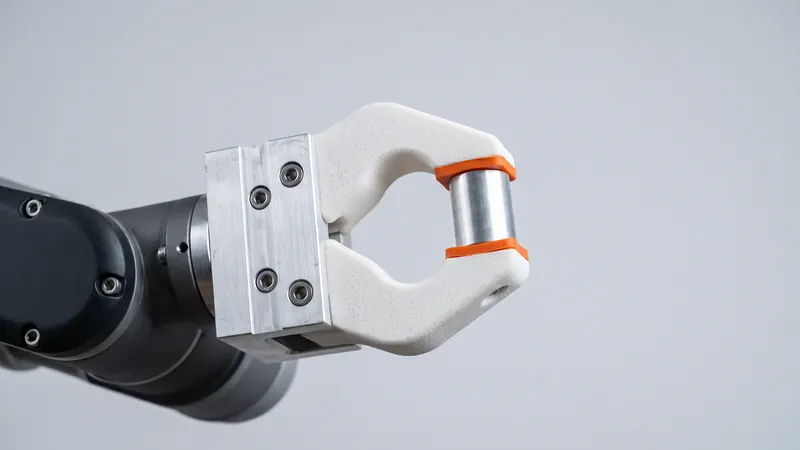
Robot grippers usually come with standard jaws, and the part-specific fingers are made separately for each application. SLS 3D printing in PA 12 is a natural fit for those fingers, nests and adapters: they are light, tough, shaped exactly to the part they hold and quick to change when the product changes. This guide covers what to print, how to design fingers that grip reliably, how to mount them and where the limits are.
What to print for a robot cell
| Part | Purpose | Why SLS fits |
|---|---|---|
| Gripper fingers and jaws | Hold a specific part on the standard gripper | Shaped to the part; light; quick to change |
| Nests and part holders | Locate parts at pick and place positions | Accurate pockets, no support marks, many variants per print job |
| Adapter plates and brackets | Mount grippers, sensors and cameras | Integrated cable routing and mounting features |
| Vacuum gripper bodies | Carry suction cups and channels | Internal channels without supports (see airtightness below) |
| Compliant fingers | Adapt to varying shapes | Flexible PA 12 structures in one piece |
| Cable and hose guides | Keep lines away from moving parts | Clips and chains printable in place |
Fixtures and jigs for the same cell follow the same logic; see drill templates, jigs and fixtures.
Advantages over machined fingers
- Low weight. EOS gives PA 2200 a density of 0.93 g/cm³. Lighter fingers mean less mass at the end of the arm, which leaves more of the robot's payload for the part itself.
- Shapes that follow the part. A finger can be modeled as the negative of the part it holds, with curved contact faces, undercuts and pockets that would be hard to machine.
- Integrated features. Cable channels, sensor mounts, lightening pockets and ribs come in the same print.
- Fast changes. When the product changes, the finger changes with it: edit the CAD, upload, order. Spare sets cost no more than the first ones.
- Gentle on parts. Nylon is softer than steel or aluminium, which helps with painted, polished or delicate surfaces.
Designing fingers that grip reliably
- Locate, then clamp. Let the part settle into a V-shape, a pocket or against pins first, and use the clamping force only to hold it. A part that is located does not need a high force.
- Leave clearance. Use our design guideline of ±0.3 % (at least ±0.3 mm) and add clearance around the part; see SLS tolerances and clearances.
- Chamfer the entry. Lead-in chamfers guide the part into the finger when positions vary slightly.
- Stiffen with ribs. Long fingers bend under load. Ribs and a wider cross-section near the root are more effective than solid blocks; keep walls even, about 1.5 to 3 mm, and hollow thick sections.
- Round internal corners. The root of a finger carries the highest stress; fillets prevent cracks.
- Mind the layer plane. PA 2200 is strongest within the layer plane (EOS: 48 MPa and 18 % elongation, compared with 42 MPa and 4 % across the layers). In the calculator you can choose the layer plane per part, so the finger bends within the layers.
Mounting the fingers
- Screws through the finger into the gripper jaw, with washers to spread the clamping load on the nylon.
- Threaded inserts where screws go into the printed part and are removed often; see threads and heat-set inserts in SLS PA 12.
- Locating pins in reamed holes, so the finger sits in the same position every time it is replaced. Design the holes to nominal size and ream them to the exact fit.
- Flat contact faces on the jaw interface, so the clamping force is carried by the surface and not by the screws alone.
Vacuum and air channels
SLS can print internal channels that connect suction cups to one port, without any supports. Two points need attention. First, the powder must be able to leave each channel, so every channel needs openings, and long, narrow channels are hard to clean. Second, sintered PA 12 is slightly porous and not automatically airtight: thin walls can leak. Use generous walls around channels, test the vacuum on the first part and seal or coat surfaces if needed. We do not offer a sealing treatment; see watertight SLS parts.
Pads and compliant fingers
We print PA 12 only, so soft contact surfaces are added afterwards: rubber pads glued into a pocket or clamped in a groove designed into the finger. Another option is a finger that adapts by bending, such as a fin-ray structure that wraps around round or irregular parts. These follow the rules for flexures; see 3D-printed springs and compliant mechanisms.
Color and identification
Every part is glass-bead blasted and polished. Dyeing helps to tell finger sets apart at a glance, for example one color per product variant. Black and orange are in stock; the other 59 colors add about one month (20 working days) to the delivery time, at the same price. An embossed part number or revision letter on each finger helps with spare sets; see text and logos on SLS parts.
Limits
- Heat: EOS gives a heat deflection temperature of 64 °C at 1.80 MPa for PA 2200; fingers that handle hot parts need checking. See PA 12 heat, chemical and UV resistance.
- High clamping forces and heavy parts: check the load or use metal for loaded sections.
- Wear: fingers that slide against abrasive parts wear; plan spare sets.
- Safety: the safety of a robot cell is the responsibility of whoever integrates and operates it. We do not certify parts for safety functions.
Need a complete gripper or end-of-arm tool designed? The engineers at prototype.builders can develop it with you.
Frequently asked questions
Why 3D print robot gripper fingers?
Gripper fingers are specific to each part and often change with the product. SLS prints them in tough PA 12 directly from CAD, shaped to the part, light and without machining, so a new or improved finger is one upload away.
Is PA 12 strong enough for gripper fingers?
For most handling tasks with light to moderate loads, yes. EOS gives PA 2200 a tensile strength of 48 MPa and a density of 0.93 g/cm³. For heavy parts, hot parts or fingers under high clamping forces, check the load or use metal for the loaded sections.
How do I mount printed fingers on a gripper?
Use the gripper's mounting pattern with through holes for screws, heat-set or press-in threaded inserts for repeated assembly, and reamed holes for locating pins. Spread the clamping force with washers or a flat contact face.
Can vacuum channels be printed into the part?
Internal channels can be printed without supports, but sintered PA 12 is slightly porous and not automatically airtight. Keep walls generous, test the vacuum and seal surfaces if needed. Channels need openings so the powder can be removed.
Can you print soft gripper pads?
We print PA 12 only. Soft contact surfaces are usually made by gluing or clamping rubber pads onto the printed finger, or by designing flexible PA 12 structures such as fin-ray fingers.
Get an instant price
Upload STEP or STL files to the calculator and see the price of your parts in seconds: white Nylon PA 12, blasting and polishing included, optional dyeing in 61 colors, three delivery speeds. From there you send the order preview for confirmation.
Another material, an NDA or a large series? Write to us. For design help and prototype development see prototype.builders.
Get an instant price